Krungsri Mobile Banking
Accept instant payments via Krungsri Mobile app from Bank of Ayudhya (Krungsri), one of Thailand's Big 5 banks with 4+ million users and strong corporate banking presence.
Payment Flow
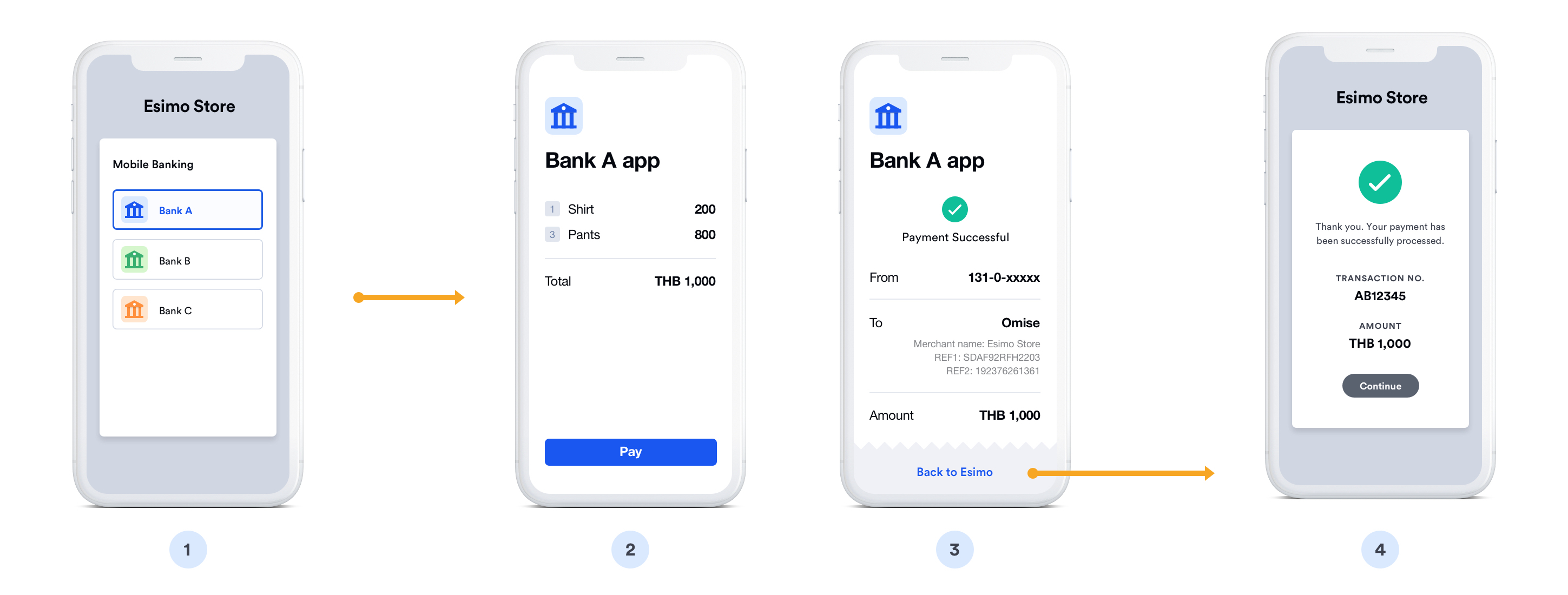
Step-by-step mobile banking payment process:
❶ Select Bank - Customer chooses their bank at merchant checkout
❷ Redirect to bank - System redirects to bank's payment authorization page
❸ Open banking app - Deep link automatically launches the bank's mobile app
- On iOS: Opens via Universal Links
- On Android: Opens via App Links
- Customer sees "Open in [Bank] App" prompt
❹ Authenticate - Customer logs into banking app (if not already logged in)
- PIN entry (6 digits)
- Fingerprint scan
- Face ID recognition
❺ Review payment - Transaction details displayed in app:
- Merchant name
- Payment amount
- Order reference
- Account to debit from
❻ Authorize payment - Customer confirms the transaction
- Enter additional PIN/OTP if required by bank
- Tap "Confirm Payment" button
❼ Payment processed - Bank immediately transfers funds
❽ Confirmation - Success screen shown in app
- Transaction reference number
- Receipt available for download
❾ Return to merchant - Customer redirected back to merchant website
- Automatic redirect or "Return to Merchant" button
- Order confirmation page displayed
Typical completion time: 30-90 seconds
Overview
Krungsri Mobile is the banking app from Bank of Ayudhya (BAY), commonly known as Krungsri. As one of Thailand's largest banks and part of the Mitsubishi UFJ Financial Group, Krungsri serves both retail and corporate customers with innovative digital banking solutions.
Key Features:
- ✅ Fast confirmation - Near real-time payment verification (typically within seconds)
- ✅ 4+ million users - Strong presence in Bangkok and major cities
- ✅ International backing - Part of MUFG (Japan's largest bank)
- ✅ High limits - Up to ฿150,000 per transaction
- ✅ Modern UX - Award-winning mobile app
- ✅ Refund support - Full and partial refunds
Supported Region
| Region | Currency | Min Amount | Max Amount | API Version |
|---|---|---|---|---|
| Thailand | THB | ฿20.00 | ฿150,000.00 | 2017-11-02 |
How It Works
Payment Flow:
- Customer selects "Krungsri" at checkout
- Merchant creates source and charge
- Customer redirected to open Krungsri Mobile app
- Customer authenticates with PIN, fingerprint, or Face ID
- Customer reviews and confirms payment
- Customer returns to merchant website
- Webhook confirms payment status
Typical completion time: 30-90 seconds
Implementation
Create Source and Charge
- Node.js
- PHP
- Python
const omise = require('omise')({
    secretKey: 'skey_test_YOUR_SECRET_KEY'
});

// Create source (BAY = Bank of Ayudhya)
const source = await omise.sources.create({
    type: 'mobile_banking_bay',
    amount: 100000,  // ฿1,000
    currency: 'THB'
});

// Create charge
const charge = await omise.charges.create({
    amount: 100000,
    currency: 'THB',
    source: source.id,
    return_uri: 'https://yourdomain.com/payment/callback'
});

// Redirect to Krungsri Mobile app
res.redirect(charge.authorize_uri);
<?php
$source = OmiseSource::create(array(
    'type' => 'mobile_banking_bay',
    'amount' => 100000,
    'currency' => 'THB'
));

$charge = OmiseCharge::create(array(
    'amount' => 100000,
    'currency' => 'THB',
    'source' => $source['id'],
    'return_uri' => 'https://yourdomain.com/payment/callback'
));

header('Location: ' . $charge['authorize_uri']);
?>
import omise

omise.api_secret = 'skey_test_YOUR_SECRET_KEY'

source = omise.Source.create(
    type='mobile_banking_bay',
    amount=100000,
    currency='THB'
)

charge = omise.Charge.create(
    amount=100000,
    currency='THB',
    source=source.id,
    return_uri='https://yourdomain.com/payment/callback'
)

return redirect(charge.authorize_uri)
Refund Support
// Full or partial refund within 30 days
const refund = await omise.charges.refund('chrg_test_...', {
    amount: 100000  // Full or partial amount
});
Testing
Test Amount: ฿1,000 (100000 smallest unit) Expected: Successful payment in test mode
FAQ
What is Krungsri?
Krungsri (Bank of Ayudhya) is one of Thailand's Big 5 banks. It's owned by MUFG (Mitsubishi UFJ Financial Group), Japan's largest bank, providing strong international backing and innovative digital banking services.
Do customers need a Krungsri account?
Yes, customers must have an active Krungsri (Bank of Ayudhya) account and the Krungsri Mobile app installed. The app is free on iOS and Android.
What are the transaction limits?
- Per transaction: ฿20 to ฿150,000
- Daily limit: Up to ฿2,000,000 (varies by customer account type)
Customers can adjust their daily limits in the Krungsri Mobile app settings.
How long does settlement take?
Krungsri mobile banking settlements typically occur within 1-2 business days. Check your Omise dashboard for specific settlement schedules.
Can I refund Krungsri payments?
Yes, full and partial refunds are supported within 30 days of the original transaction.
What if payment expires?
Payments expire after 15 minutes. Allow customers to retry with a new charge. Display a countdown timer to show remaining time.
Is Krungsri available 24/7?
Yes, Krungsri Mobile is available 24/7 including weekends and holidays. However, settlement follows business day schedules.
Related Resources
- Mobile Banking Overview - All mobile banking options
- Bank Transfers Overview - All bank payment methods
- Testing - Test your integration